
Windows machines slow down for a lot of reasons at once: outdated drivers, leftover files from uninstalled programs, junk registry entries, and background bloat that accumulates quietly over months. IObit has spent close to two decades building a suite of Windows utilities aimed at fixing exactly those problems, and the current lineup covers driver updates, system cleanup, malware protection, disk defragmentation, and software updates as five separate but complementary tools.
Driver Booster: Fixing the Problem Most People Never Think About
Outdated or broken drivers are a common cause of blue screens, random freezes, and hardware that simply stops behaving correctly, yet manually updating drivers is tedious enough that most people never bother. Driver Booster addresses this by scanning against a database of more than 18 million verified drivers, covering everything from graphics cards and motherboards to keyboards, mice, and audio devices. It specifically supports NVIDIA, AMD, and Intel graphics drivers, including the “Game Ready” style driver releases that fix bugs and unlock performance improvements for newer games, along with Microsoft’s own official driver updates. For anyone who has ever tracked down a single driver update manually, one-click scanning across an entire system is a meaningful time save.
Advanced SystemCare: The All-in-One Cleanup and Speed Tool
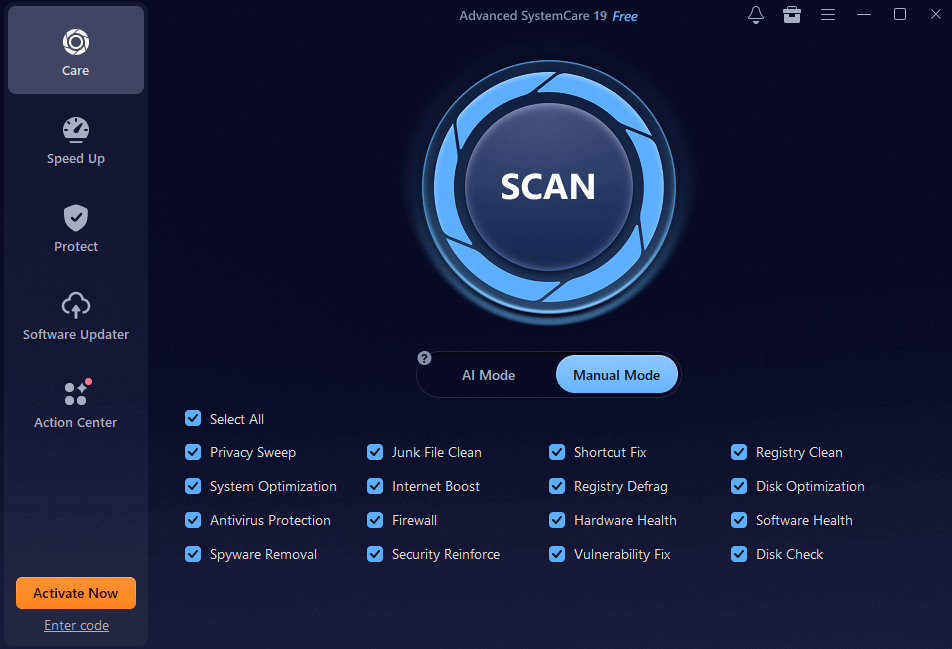
Advanced SystemCare is IObit’s flagship product and functions as the closest thing to a single dashboard for overall PC health. It handles junk file cleanup, registry repair, startup optimization, and privacy sweeps, alongside a Turbo Boost feature aimed at speeding up boot times and freeing resources for whatever is actively running. Independent reviews have generally described it as approachable for non-technical users, with the free version covering the basics and the Pro tier unlocking deeper cleanup and automation features. User feedback echoes a similar pattern: incremental improvements to boot speed and general responsiveness build up over repeated use rather than delivering one dramatic fix.
IObit Malware Fighter: Security Layered On Top of an Existing Antivirus
Rather than positioning itself as a full antivirus replacement, IObit Malware Fighter is built to run alongside Windows Defender or another existing security tool, adding an extra scanning layer focused on malware, spyware, and increasingly common browser-hijacking threats. That layered approach makes sense given how much malware today specifically targets browser settings and search redirects rather than traditional file-based infections, an area a general-purpose antivirus doesn’t always catch as thoroughly.
Smart Defrag and IObit Uninstaller: The Less Glamorous Essentials
Smart Defrag handles disk defragmentation and optimization, still relevant for anyone running a traditional hard drive rather than an SSD, where fragmented files genuinely do slow down read and write speeds over time. IObit Uninstaller solves a different, more universal problem: standard Windows uninstalls routinely leave behind registry entries, leftover folders, and orphaned files that accumulate over years of installing and removing software. A proper uninstaller tool that actually scrubs those remnants tends to matter more for long-term system health than most people realize until they’ve reinstalled Windows once and noticed how much faster the machine ran.
IObit Software Updater: Closing the Gap Windows Leaves Open
Windows Update keeps the operating system itself current, but it does nothing for the dozens of separate applications installed on a typical machine, many of which quietly fall behind on security patches without the user ever noticing. IObit Software Updater is built specifically to close that gap, automatically detecting outdated applications and handling updates in bulk rather than requiring a manual check through each program’s own update mechanism.
Free Tools Alongside the Core Products
IObit also runs a set of browser-based diagnostic and utility tools that don’t require installing anything: a “Can I Run It” game compatibility checker, a bottleneck calculator, an internet speed test, webcam and microphone testers, and even AI-powered photo and video enhancement tools. These free utilities function as a low-commitment way to get a feel for the brand before deciding whether the paid desktop suite is worth adding on top.
Free Versus Pro: What Actually Changes
Every core IObit product has a free tier that covers the fundamental version of its main function, whether that’s basic driver detection, basic cleanup, or basic malware scanning. The Pro versions generally add automation (scheduled scans instead of manual ones), faster download speeds for driver and definition updates, and deeper cleanup options that go beyond the surface-level fixes. For anyone who only needs an occasional cleanup, the free tier is a reasonable starting point; for anyone managing multiple machines or wanting things to run automatically in the background, the Pro tier’s automation tends to be the deciding factor rather than any single standout feature.
Worth Trying Before a Full Reinstall
A Windows machine that’s slowed down over a few years of regular use doesn’t always need a full wipe and reinstall to feel fast again. Between driver updates, genuine junk cleanup, leftover file removal, and an added malware scanning layer, IObit’s suite covers most of the common causes of PC slowdown in one place, and the free tiers make it realistic to try before deciding whether the Pro versions are worth paying for.